SENSMAX SE/DE HANDHELD DATA COLLECTOR
1. Description
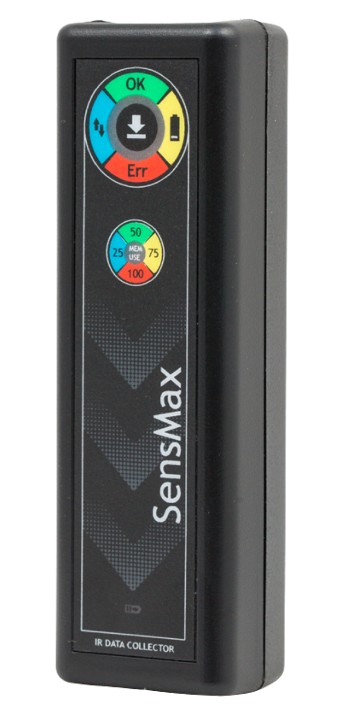
The SensMax SE/DE handheld data collector is a mobile device designed to collect accumulated visitor statistics from SensMax SE (uni-directional) and SensMax DE (bi-directional) autonomous infrared counting sensors.
The collector does not require a permanent connection to a computer. Data collection from the sensors is carried out remotely via a secure infrared (IR) communication channel. To download data, simply point the collector at the sensor's front panel and press the "READ" button.
The device is capable of servicing up to 100 different sensors. All collected data is securely stored in the collector's internal memory (capacity up to 2000 days) until it is transferred to a computer via a USB connection.
Key Advantages:
- Data collection without cables or Wi-Fi/Ethernet networks.
- Servicing of up to 100 sensors with a single device.
- Built-in Li-Ion battery (up to 60 days of operation without recharging).
- Easy data export to SensMax EasyReport software.
2. Technical Specifications
- Data Collection Method: Manual, via infrared channel (IR-channel).
- Reading Distance: Up to 1 meter from the sensor.
- Supported Sensors: SensMax SE, SensMax DE.
- Number of Serviced Sensors: Up to 100 sensors per collector.
- Memory Capacity: Stores statistics for 2000 days.
- Power Supply: Built-in Li-Ion battery (600 mAh).
- Battery Life: About 60 days on a single charge.
- Charging and Data Transfer: Via USB port (cable included). Charging occurs automatically when connected to a PC.
- Enclosure Dimensions: 110 × 25 × 25 mm.
- Enclosure Material: ABS plastic, color black.
3. Controls and Indication
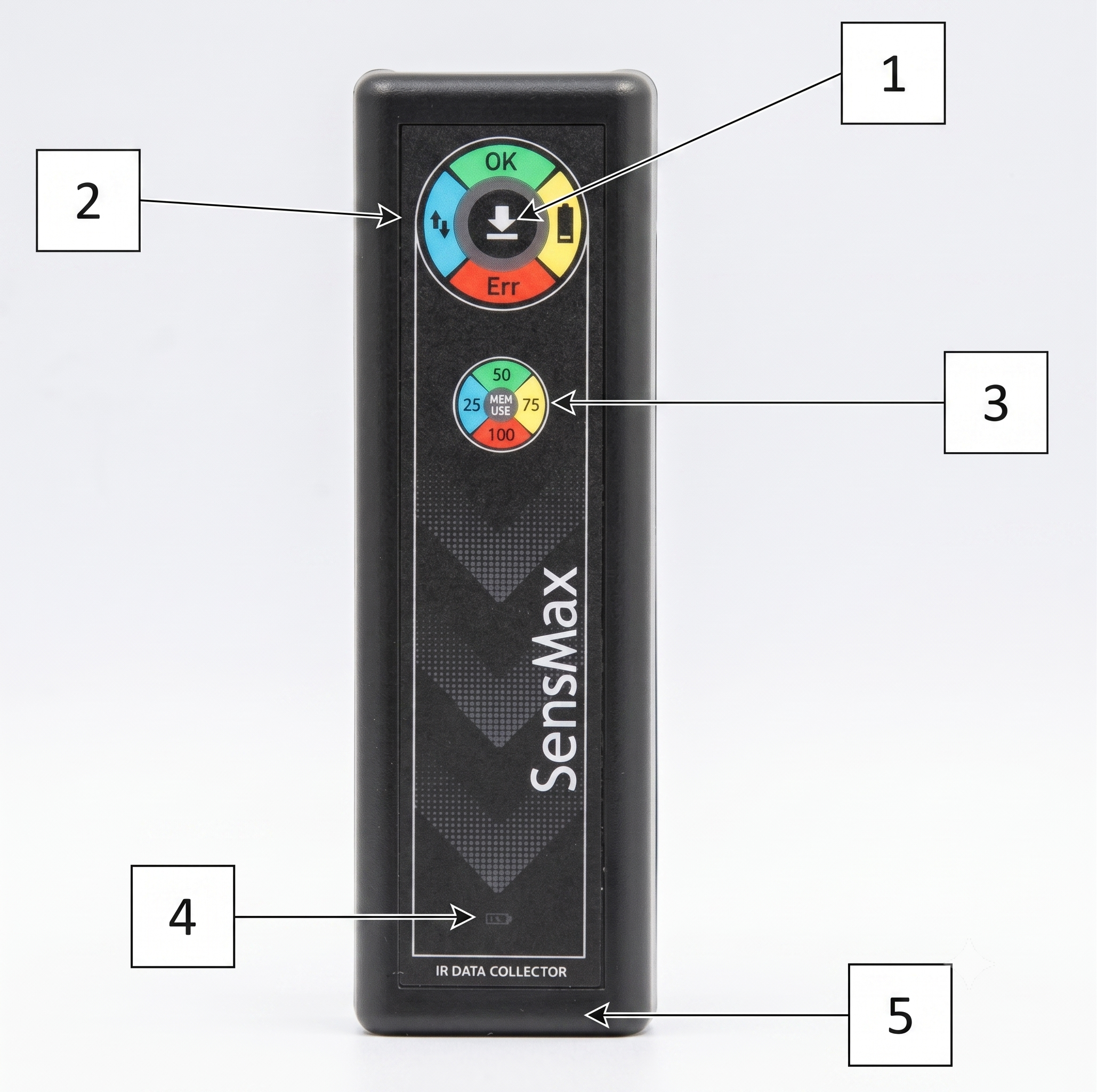
The front panel of the collector features a reading button and a group of LED status indicators.
| Element / LED | Status | Description |
|---|---|---|
| [1] READ Button | Short push | Initializes data reading from the sensor. |
| [2] Status indicator | Flashing blue | Data reading is in process. |
| Solid blue | Device is connected via USB. | |
| Flashing green | Data reading successfully finished. | |
| Flashing yellow | Low collector battery charge. | |
| Solid red (3 sec) | No sensor found (out of range). | |
| Flashing red (2 times) | Data reading not completed / interrupted. | |
| Flashing red (3 times) | Built-in clock error (time/date clock error). | |
| [3] Memory use indicator | Blue | Memory used for 25% or less. |
| Green | Memory used for 50%. | |
| Yellow | Memory used for 75%. | |
| Red | Memory used for 100%. | |
| [4] Battery charge indicator (CHARGE) | Solid yellow | Charging is in process. |
| No light (when on USB) | Charging finished (battery fully charged). |
4. Operation Procedure and Data Reading
1. Time Setup and Synchronization
Before first use, you need to synchronize the collector's clock:
- Run the SensMax EasyReport software on your computer.
- Connect the SE/DE collector to a USB port on your computer.
- Wait for about 1 minute. The collector will automatically receive the exact time from your PC.
- Disconnect the collector from USB (the cable must be disconnected before reading data from the sensors).

(Note: when connected via USB, the collector also automatically charges. The CHARGE indicator will turn off when the battery is fully charged).
2. Data Collection from Sensors (Reading)
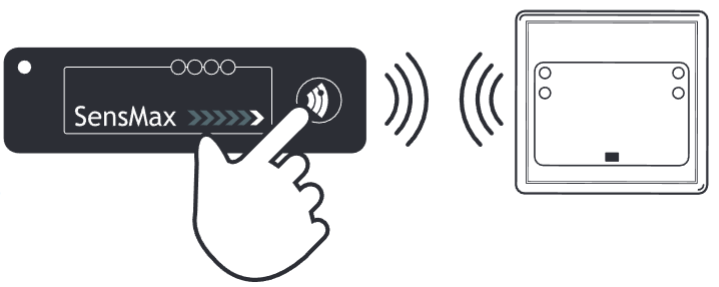
- Approach the installed SensMax SE or DE sensor.
- Point the collector's front panel directly at the sensor from a distance of no more than 1 meter.
- Press the READ button on the collector.
- Wait for the Status Indicator to flash green — this means the data has been successfully copied. (If the indicator lights up red, make sure you have pointed the collector exactly at the sensor and are close enough).
3. Data Transfer to PC (Export)
- After walking around the sensors, return to the computer and connect the collector via USB.
- Open the SensMax EasyReport software.
- Click the "Download from collector" button.
- The data will be imported into the local database, after which you can build charts and analytical reports.
5. Ordering Information
| Model / Part Number | Description | Compatible Sensors |
|---|---|---|
| SensMax SE/DE | Handheld infrared data collector | SensMax SE, SensMax DE |
Contacts
- Phone: +371 67553110
- Email: office@sensmax.lv
- Website: www.sensmax.eu
- Telegram: t.me/sensmax
- Facebook: facebook.com/sensmaxmanufacturer
- LinkedIn: linkedin.com/company/sensmax
SensMax is a registered trademark. SensMax reserves the right to make changes to the products described herein without prior notice. The information contained in this publication regarding device applications and the like is provided solely for your convenience. SensMax disclaims all liability arising from this information and its use. The use of SensMax devices in life-support and/or safety-critical applications is entirely at the buyer's risk, and the buyer agrees to defend, indemnify, and hold harmless SensMax against any and all damages, claims, suits, or expenses arising from such use. No licenses are conveyed, implicitly or otherwise, under any intellectual property rights of SensMax.