BI-DIRECTIONAL INFRARED VISITOR COUNTING SENSORS (OFFLINE)
SENSMAX DE
1. Description
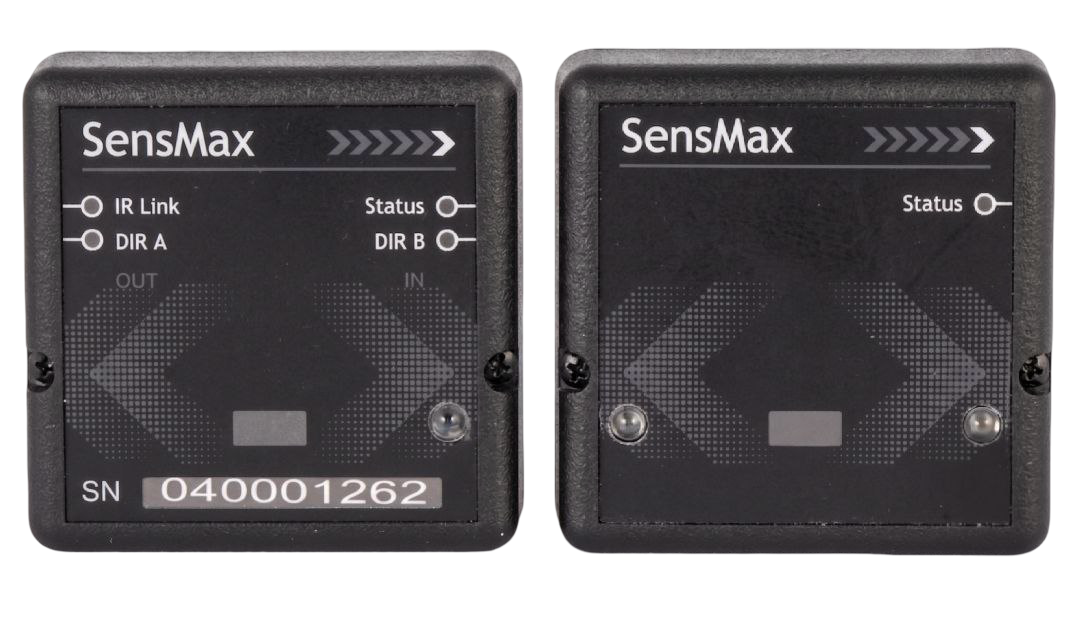
SensMax DE bi-directional infrared visitor counting sensors are autonomous, battery-powered devices designed for accurate visitor counting in areas with defined pedestrian traffic, requiring no connection to the internet or a local network.
The sensors operate on the principle of infrared beam interruption. The distinguishing feature of bi-directional models is their ability to accurately determine the direction of a visitor's movement as In (IN) or Out (OUT).
Each sensor structurally consists of two physical units — a Transmitter (TX) and a Receiver (RX), which are installed strictly opposite each other on the walls or frames of corridors, doors, or entrances. The transmitter emits an invisible, focused infrared barrier. Every intersection of this barrier is registered by the receiver, which instantly determines the direction of passage and stores the data in its internal memory.
Key Advantages:
- Direction of Movement Detection (IN/OUT): Separate counting of incoming and outgoing visitors for detailed attendance analysis.
- 100% Autonomous Operation: Powered by standard AA batteries, eliminating the need for any cabling.
- Wireless and Network-Free Data Collection: Data is read using a SensMax SE/DE handheld data collector via an infrared communication channel. This is an ideal solution for facilities where deploying IT infrastructure is impossible or unnecessary.
- Large Memory Capacity: The sensor can store up to 150 days of hourly statistics in its internal memory.
- Easy Installation: Installation takes just a few minutes and can be performed on any flat surface using the provided heavy-duty double-sided tape or specialized mounting brackets.
- GDPR and Privacy Compliant: 100% compliant with personal data protection laws, as the sensors collect purely numerical crossing statistics without recording video or registering personal data.
2. System Architecture
The SensMax DE sensor operates in offline mode (without using a radio channel for automatic transmission). The data accumulated in the sensor's memory is read manually by staff using a special portable device — the SensMax SE/DE handheld data collector.
To collect statistics, you simply need to approach the sensor to a distance of less than 1 meter, point the collector at the sensor's front panel, and press the read button on the collector. Data is transmitted over a secure infrared channel. The collector is then connected to a PC via USB, and the data is transferred to the SensMax EasyReport software for generating charts and analytics.
3. Features and Advantages of Bi-directional Counting
Unlike uni-directional systems, the DE sensor offers deeper analytics thanks to the separation of movement directions:
- Separate Counting of Entries and Exits: Allows for accurate assessment of sales conversion, distribution of flows within retail areas, and identification of peak load periods.
- Clean Statistics: Eliminates the need for mathematical division of crossings by 2 in dead-end zones, as the sensor clearly understands whether a person entered or exited.
4. Application
Retail stores, boutiques, shopping centers, libraries, museums, exhibition areas, or any other facilities where cabling is difficult, Wi-Fi / Ethernet is absent, or where installing an automatic data transmission system is not economically feasible.
5. Delivery Set
The standard SensMax DE sensor delivery set includes:
- Transmitter unit (TX) — 1 pc.
- Receiver unit (RX) — 1 pc.
- AA 1.5V alkaline batteries — 4 pcs.
- L-type mounting brackets — 2 pcs.
(The SensMax SE/DE handheld data collector is purchased separately; one collector can service up to 99 sensors).
6. Technical Specifications
- Operating Principle: Interruption of infrared beams (Bi-directional determination of IN/OUT direction).
- Passage Width:
- Optimal: 1.0 m – 6.0 m.
- Maximum: up to 9.0 m.
- Data Collection Method: Manual, using the SensMax SE/DE data collector via infrared channel.
- Collector Reading Distance: less than 1 meter.
- Internal Memory: 150 days of hourly data.
- Counting Accuracy:
- 95% at a passage width up to 3.0 m.
- Margin of Error: For passage widths over 3.0 m, counting accuracy decreases by approximately 0.6% – 1.0% for each additional meter.
- Infrared Beam Angle: The beam divergence is 6°.
- Power Supply: 4 AA batteries (2 pcs. per TX and RX unit).
- Battery Life: from 6 to 12 months.
- Operating Temperature: from -20°C to +55°C (can be extended to -30°C by using 1.5V lithium batteries, such as Energizer Ultimate Lithium 1.5V).
- Protection Class: IP54 (IP68 in a special outdoor protective housing).
- Enclosure Dimensions: 67 × 67 × 25 mm (for each Transmitter and Receiver unit).
- Enclosure Material: ABS plastic, colors — black or white.
7. Sensor Elements and Indication
The receiver and transmitter units are equipped with LED status indicators and buttons for configuration, diagnostics, and testing.
Receiver (RX)
Front View (Receiver RX)
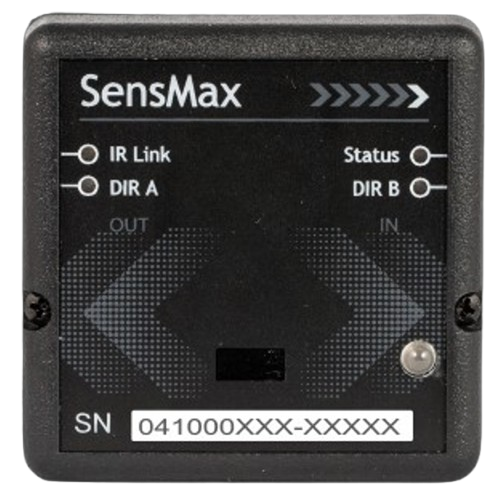
[1] IR Link LED - Orange
[2] DIR A LED - Red (OUT direction)
[3] DIR B LED - Red (IN direction)
[4] Status LED - Green
[5] Device serial number
Rear / Inside View (RX)
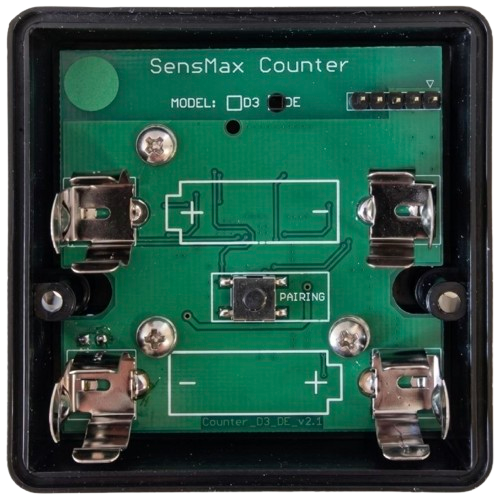
[6] Battery compartment (2x AA)
[7] Pairing button
Receiver RX Indicator Table
| Element / LED | Type / Color | Status | Description |
|---|---|---|---|
| [1] Link LED | LED / Orange | Flashes | Indicates that the transmitter and receiver units are properly aligned and the IR barrier is active. |
| [2] DIR A LED | LED / Red | Flashes | Lights up upon each visitor count in the OUT direction (according to standard installation). |
| [3] DIR B LED | LED / Red | Flashes | Lights up upon each visitor count in the IN direction (according to standard installation). |
| [4] Status LED | LED / Green | Flashes 1x in 30 s | Flashes rarely (once per 10 sec) in standby mode. Flashes rapidly (1 time per sec) when a visitor passes (fast scanning mode for determining direction). |
| [6] Battery compartment | Hardware | N/A | Located inside the enclosure. Holds 2 AA batteries. |
| [7] Pairing button | Button | Press 1 time | Internal button for initializing the sensor and pairing it with the SensMax SE/DE handheld collector. |
Transmitter (TX)
Front View (Transmitter TX)
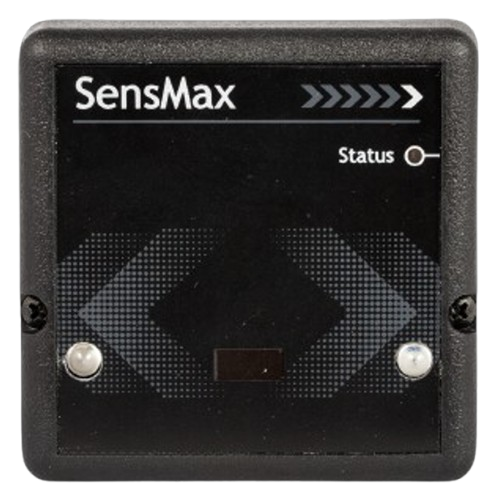
[1] Status LED - Green
Rear / Inside View (TX)
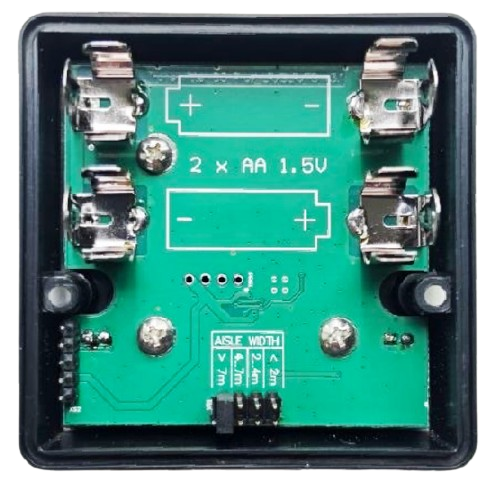
[2] Battery compartment (2x AA)
[3] Aisle width selector (AISLE WIDTH)
Transmitter TX Indicator Table
| Element / LED | Type / Color | Status | Description |
|---|---|---|---|
| [1] Status LED | LED / Green | Flashes | Indicates that the device is turned on and operating normally. |
| [2] Battery compartment | Hardware | N/A | Located inside the enclosure. Holds 2 AA batteries. |
| [3] AISLE WIDTH | Selector / Switch | Setup | Infrared beam power switch corresponding to the passage width. |
8. Physical Mounting and Alignment
Height and Positioning
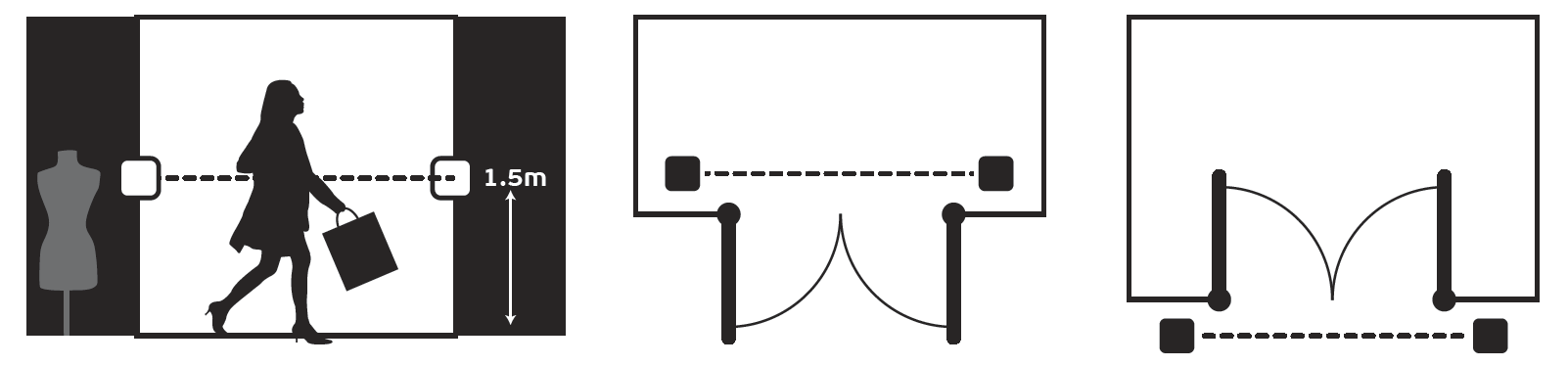
- Recommended Height: Install the sensors at a height of 1.5 – 1.6 meters from the floor level. This height is optimal for detecting crossings by a human torso, excluding false triggers from low-hanging bags or animals.
- Horizontal Alignment: The Transmitter (TX) and Receiver (RX) units must be installed strictly opposite each other on the same horizontal axis. The precision of horizontal and vertical alignment is critically important for the correct recognition of passage directions.
- Surface Preparation: The surface prior to mounting must be cleaned of dust and degreased. Mounting is done using the provided heavy-duty double-sided tape or screws.
Direction Orientation (DIR A / DIR B)
Proper orientation of the sensor units during installation is critically important for correctly registering visitor movement directions (In / Out):

- DIR A LED (on the RX receiver unit) and its corresponding IR beams should be oriented towards the outside of the store (towards the street, shopping mall gallery, or corridor). Crossing the beams from the DIR A side is registered by the system as In (IN).
- DIR B LED (on the RX receiver unit) and its corresponding IR beams should be oriented towards the inside of the store (towards the sales floor or room). Crossing the beams from the DIR B side is registered as Out (OUT).
Note
If the orientation of the units is mixed up during installation, the statistics in the SensMax reports will be inverted (ins will be displayed as outs, and vice versa). The counting direction can be manually corrected in the SensMax software settings, however, to avoid unnecessary confusion, it is recommended to initially install DIR A facing outwards and DIR B facing inwards.
9. Commissioning and Data Reading
Step 1. Time Setup and Synchronization on the Collector
- Install and run the EasyReport software on your PC.
- Connect the SensMax SE/DE handheld collector to the PC using a USB cable.
- Wait for about 1 minute — the collector will automatically synchronize its time with your computer.
- Disconnect the collector from USB (the collector's battery charges while connected; the CHARGE indicator turns off when fully charged).
Step 2. Pairing the Sensor with the Collector
To initialize the sensor, perform the following steps:
- Insert the batteries into the sensor units, observing polarity.
- Open the receiver (RX) cover and press the internal button once.
- Within the next 10 seconds, point the handheld collector directly at the sensor's front panel (at a distance of less than 1m) and press the READ button on the collector. (Attention: before reading, make sure to disconnect the collector from the USB cable).
After the first reading by the collector, the sensor starts operating and counting visitors. Make sure that when the beam between the units is crossed, the corresponding direction indicators (DIR A or DIR B) on the receiver flash.
Step 3. Regular Data Collection
You can read data at any frequency convenient for you: multiple times a day, once a week, once a month, or even once every 150 days (which is the capacity of the DE sensor's internal memory).
- Approach the sensor and point the collector at the front panel from a distance of less than 1 meter.
- Press the READ button on the collector to copy the accumulated hourly statistics from the sensor to the collector's memory.
- Return to the computer and connect the collector via USB.
- In the EasyReport software, select the collector and click Download from collector to import the statistics into the database and build reports.
10. Certification and Standards Compliance
- CE (Conformité Européenne): Fully compliant with EU directive requirements.
- RoHS: Manufactured without the use of hazardous substances.
- GDPR Compliant: Sensors fully comply with the EU General Data Protection Regulation. They record exclusively quantitative anonymous statistics.
11. Ordering Information
Bi-directional Sensors (Offline)
| Model / Part Number | Description | Compatible Collector |
|---|---|---|
| SensMax DE | Bi-directional infrared visitor counting sensor (offline) | SensMax SE/DE |
Data Collectors
| Model / Part Number | Description | Compatible Sensors |
|---|---|---|
| SensMax SE/DE | Handheld data collector for infrared offline sensors | SensMax SE, SensMax DE |
Accessories
| Model / Part Number | Description | Compatible Sensors |
|---|---|---|
| V-type bracket | Plastic rotatable bracket (up to 180° horizontally) | All SE/DE series sensors |
| L-type bracket | 90-degree bracket for perpendicular mounting | All SE/DE series sensors |
| Outdoor housing | Hermetic waterproof protective box (IP68) | All SE/DE series sensors |
Contacts
- Phone: +371 67553110
- Email: office@sensmax.lv
- Website: www.sensmax.eu
- Telegram: t.me/sensmax
- Facebook: facebook.com/sensmaxmanufacturer
- LinkedIn: linkedin.com/company/sensmax
SensMax is a registered trademark. SensMax reserves the right to make changes to the products described herein without prior notice. The information contained in this publication regarding device applications and the like is provided solely for your convenience. SensMax disclaims all liability arising from this information and its use. The use of SensMax devices in life-support and/or safety-critical applications is entirely at the buyer's risk, and the buyer agrees to defend, indemnify, and hold harmless SensMax against any and all damages, claims, suits, or expenses arising from such use. No licenses are conveyed, implicitly or otherwise, under any intellectual property rights of SensMax.