Counting Zones and Lines Types
This document describes the types of counting tools supported by the SensMax TAC-B EWP radar sensor, and also explains the principles of their operation for various counting scenarios.
In the sensor's web interface, lines are drawn as segments, and zones always have a rectangular shape. For accurate coverage of the required area, any zone can be rotated, and its length and width can be changed.
Passage Lines (Gates)
A passage line (Gate or counting line) is usually used to control doors, passages, or entrances.
Each line has two directions: IN and OUT. The arrow on the line in the web interface always indicates the IN direction.
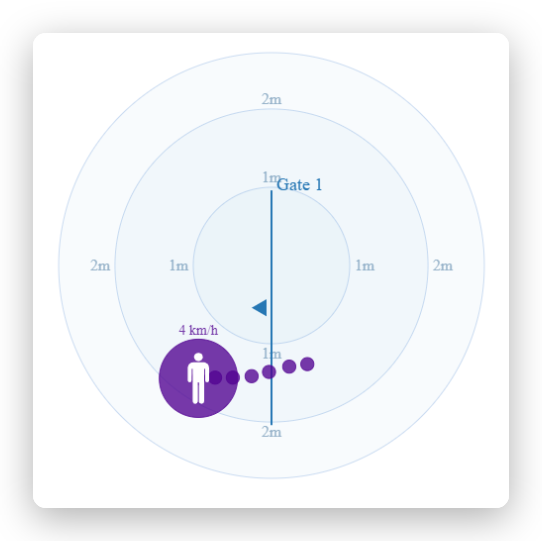
A passage line can only have the Counting line type. In this mode, the sensor performs classic counting of moving objects crossing the specified line in a certain direction.
Occupancy Monitoring Zone
This type of zone is designed to control the number of people inside a specific limited space (for example, a meeting room, a restroom, or a waiting area).
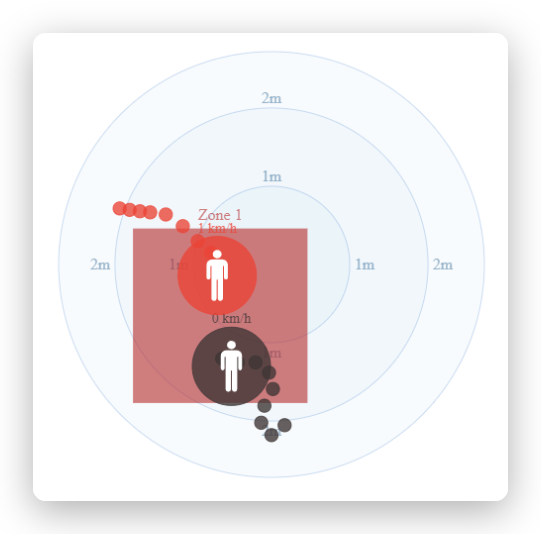
Counting principle: The system records the fact of presence in the controlled area. When an object enters the zone, an IN event is counted, and when it leaves - an OUT event. Based on these events, the sensor updates the INSIDE parameter in real time, which shows the current number of visitors inside.
Dwell time analysis: Flexible setup of the minimum dwell time (Min dwell time) is available for the occupancy zone. If this parameter is set, the radar will ignore the object until it spends the specified time inside the zone. This function allows filtering out random passers-by and recording only those visitors who purposefully stopped in the area of interest (for example, at a display window or a promotional stand).
Social distancing control: The zone allows tracking the distance between people. If visitors get closer than the allowed distance, a social distance violation is recorded, and the zone itself is highlighted in red in the web interface.
Tip
Multi-level control (overlapping zones) The interface allows you to create overlapping zones. Thus, you can place one large general zone covering the entire scene size exclusively for social distancing control, and inside it draw several local zones for accurate counting of target visitors.
Passageway Zone
This type of zone is designed to separate moving objects into IN and OUT.
In the web interface, the passageway zone is displayed with an arrow indicating the IN direction. For correct counting, it is necessary to rotate the zone so that this arrow points inside the room.
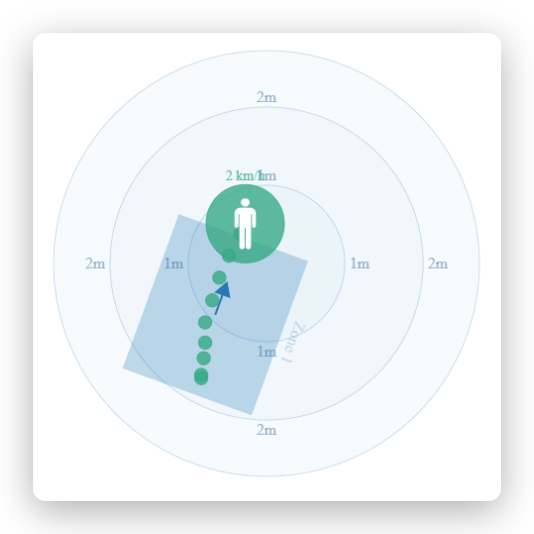
By its purpose, the passageway zone is similar to classic lines (Gates), but radically differs from them in the mechanics of operation. While a regular line performs counting strictly at a single crossing point, the passageway zone allows analyzing a vast area of space. An object can start being tracked by the radar at any point inside this zone and will be successfully counted regardless of whether it crossed a specific geometric boundary.
Moreover, the algorithm tracks object trajectories: if a person enters the passageway zone, turns around inside it, and leaves the zone in the same direction they came from, they are automatically filtered out (ignored). This allows eliminating false positives from visitors who accidentally entered the control zone and immediately exited back.
Tip
Recommendation This type of zone is the most advanced and is recommended for use in any scenarios (both outdoors and indoors) as the main alternative to classic line crossing counting.
Choosing the Right Tool
Summing up, the choice of a counting tool depends on your main task:
- If you need an intuitive, classic tool for basic counting of passing people - use Passage Lines (Gates).
- If it is important for you to control the number of people inside a specific selected area, track their dwell time at a display window, or monitor social distancing compliance - your choice is the Occupancy monitoring zone.
- If you need the most accurate and modern tool for end-to-end counting, which is not afraid of turnarounds and non-standard behavior of visitors - use the Passageway zone. We recommend using it as the main alternative to classic lines in almost any scenarios.
After you have decided on the types of zones, proceed to the instructions for detailed device configuration: